Design
Size the platform. Define the topology. Engineer compute, storage, networking, rack layout, and redundancy around your workloads.
ARCHITECTURE & CAPACITYWe build the infrastructure
your workloads run on.
Enterprise virtualization, resilient physical foundations, and repeatable automation. Designed together. Built to work together.
A platform is only as strong as the decisions beneath it. We connect architecture, physical infrastructure, virtualization, and operations into one coherent environment.
Size the platform. Define the topology. Engineer compute, storage, networking, rack layout, and redundancy around your workloads.
ARCHITECTURE & CAPACITYRack, cable, power, and configure. Integrate the physical environment with clear management paths and serviceable components.
DATACENTER & INTEGRATIONBring workloads onto a clustered platform with virtual networking, resilient storage, and deliberate availability design.
HYPERVISORS & HCITurn standards into repeatable builds. Use Image Factory, infrastructure as code, and configuration management to deploy consistently.
IMAGES & PROVISIONINGKeep the platform ready for change through monitoring, patching, backup, lifecycle management, and capacity planning.
LIFECYCLE & RELIABILITYHyper-V / Proxmox VE / VMware / Windows Server / Linux
Explore the layers behind a production platform. Every connection, component, and configuration has a job to do.
Scroll to explore each layer ↓
A customer-premises virtual workstation platform that brings compute, storage, and management into a resilient three-node HCI cluster.
Three HPE ProLiant DL360 Gen11 servers form the foundation. N+1 capacity planning allows for a node outage, subject to workload sizing and available resources.
HPE ProLiant DL360 Gen11
32 physical CPU cores per node
512 GB DDR5 ECC per node
From approximately 46 TB raw NVMe
Per node: Intel Xeon Gold 6548Y+, 32 cores; 512 GB DDR5 ECC memory, with 768 GB an option when workload sizing calls for it; redundant boot storage; enterprise NVMe; dual-port 25GbE; redundant power; HPE iLO management.
Design qualification: Example reference architecture, not a performance or capacity guarantee. Workload profiles, licensing, hardware compatibility, storage resiliency, backup retention, and recovery objectives determine the final design. *Storage Spaces Direct is used where the validated hardware and Windows Server edition support it. Usable capacity varies with resiliency and reserved capacity.
Good infrastructure starts with standards.
Image Factory turns those standards into repeatable machine images and infrastructure artifacts.
Version-controlled definitions, automated configuration, and validation help teams provision consistently, rebuild reliably, and reduce configuration drift.
Build repeatability into your platform ↗
Packer / Ansible / Terraform / PowerShell / Bash / Git & CI/CD
A customer-premises virtual workstation project, bringing user access, clustered compute, resilient networking, and independent backup into one platform design.
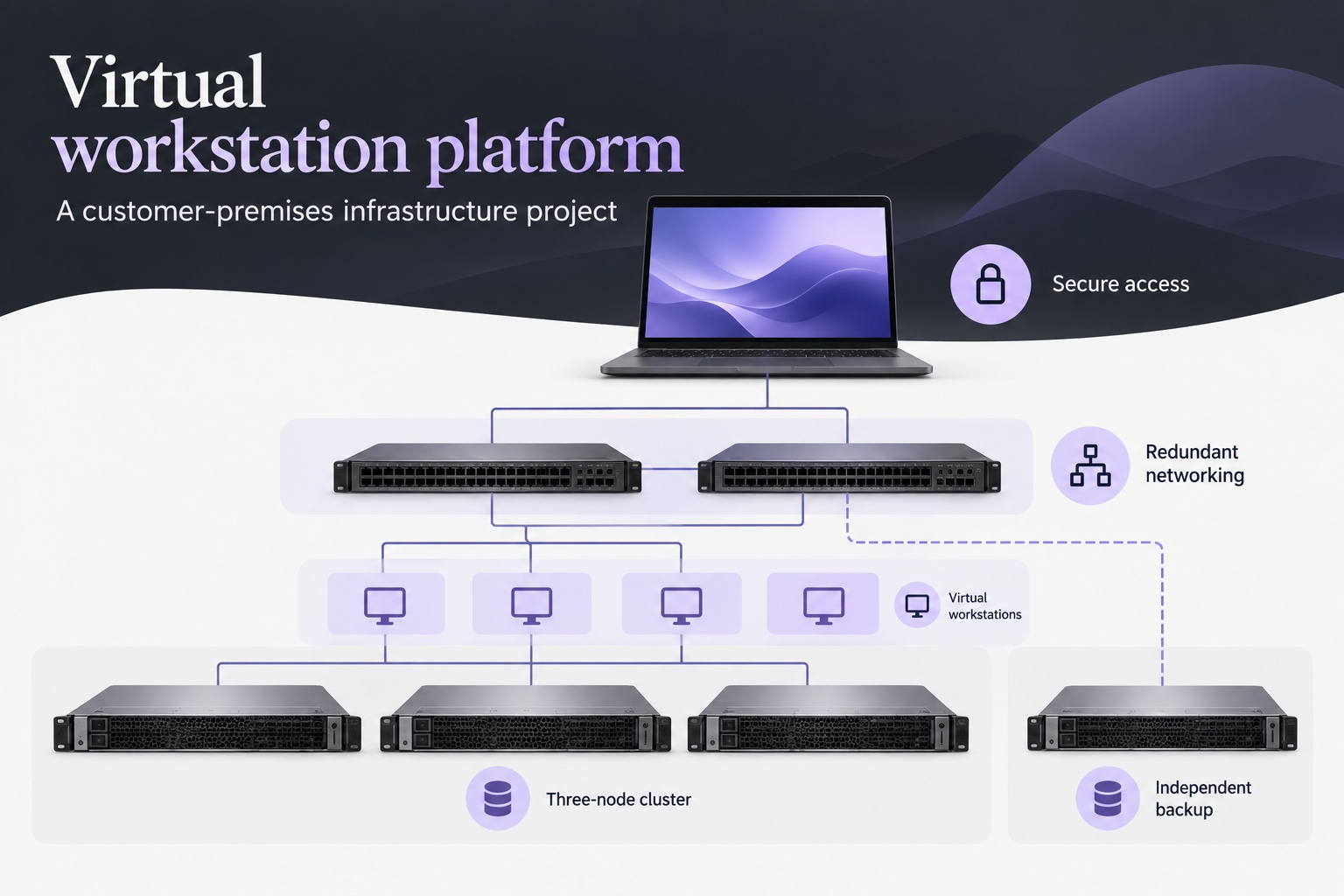
Deliver centrally hosted workstations to users while keeping the infrastructure at the customer’s premises.
Connect a three-node cluster, redundant network paths, and a separate backup platform around the workstation workloads.
Consider access, availability, serviceability, and recovery together—from the user’s device to the underlying servers.
Building a new environment? Modernizing a datacenter? Bringing consistency to infrastructure delivery?
Tell us what needs to run, what you have today, and what needs to change. We’ll start there.
[email protected] ↗DIRECT CONTACT · REAL ENGINEERING CONVERSATIONS